Record or upload audio
Upload your own geolocated recordings or use the GeoRec mobile app to record your notes.
GeoRec turns what you say in the field into geolocated data
Capture knowledge and memories connected to places.
Save what you see, hear and discover exactly where it happens. GeoRec turns every voice note into a memory you can locate.
Use our GeoRec app for Android to upload audio automatically to your private space, or use the native iPhone recorder to save voice notes and upload them on the web.
6 months free · No card required
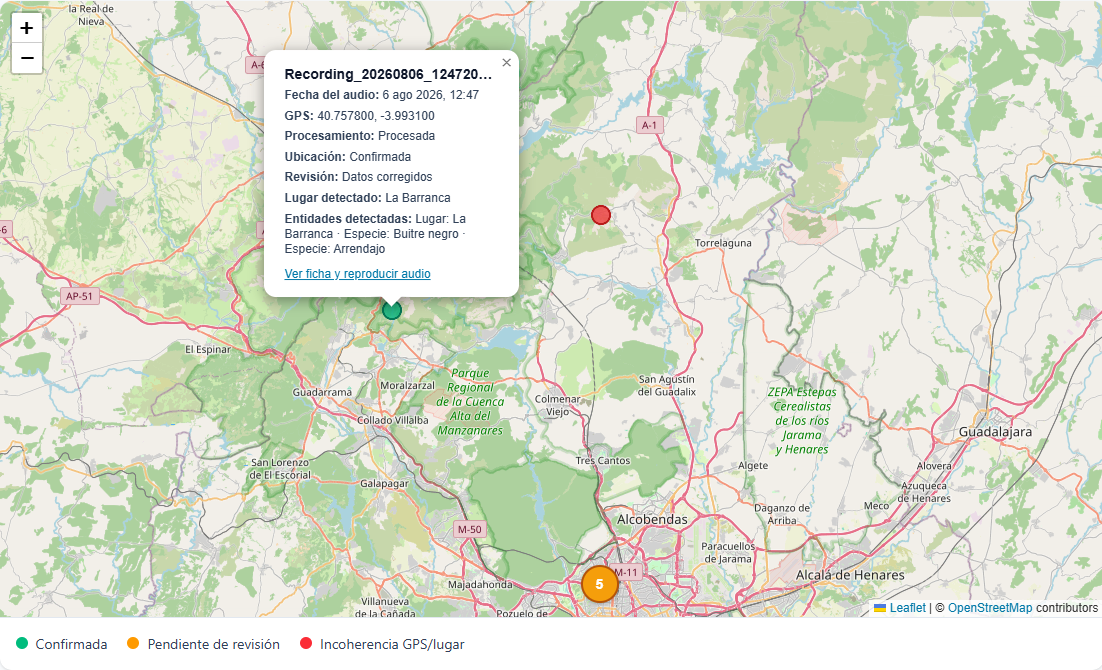
Everything in one place
Upload your own geolocated recordings or use the GeoRec mobile app to record your notes.
Accounts for individuals and work teams. Share knowledge without losing context.
Your data is private and secure, always under your control. You choose who can see and listen.
Export your data whenever you want and take it wherever you need.
Download the GeoRec app for Android for FREE and record notes directly from the place where things happen.
Start today
Enough time to fill your map with places, discoveries and voices.
Try GeoRecFollow every story
Play your notes, navigate their locations and listen to each moment again in context.
Simple plans
During launch, all plans include their first 6 months at no cost.
Routes
For those who want to create routes on a map for personal use. All functionality included.
Track
For those who want to create activity log maps and visually compare series of logs. All functionality included.
Frequently asked questions
Not necessarily. You can use the GeoRec Android app to record in the field and upload audio, or upload any geolocated recording from the web.
On iPhone, you can use the native recorder to geolocate your voice notes and upload them through the web.
To begin with, the audio files that created the records when they were imported. These audio files can be replaced later or added to manually created records. You can also add information by attaching image files and PDF files.
Yes. Your information stays private and you decide when to share it with people or teams.
Yes. GeoRec is designed for personal projects as well as teams that need to centralise field observations.
Yes. Export your data whenever you want and take it wherever you need.
The GeoRec mobile app does not use AI. The online tool uses local AI to transcribe audio. Your audio never leaves to an external service or gets shared.
Shall we talk?